
⚙ Introduction
In today’s modern security systems, having remote and local access to your CCTV cameras is essential for effective monitoring and management. Whether you are securing your home, office, shop, or organization, being able to view your cameras from a computer gives you full control over your surveillance system.
One of the most popular solutions in Ethiopia is using a Hikvision NVR (Network Video Recorder). When connected properly, it allows you to view live footage, playback recordings, and manage camera settings directly from your PC.
The good news? Accessing your Hikvision NVR using its IP address is simple and doesn’t require advanced technical skills.
In this complete guide by BlueWave Technology, you will learn:
- How to access Hikvision NVR via web browser
- How to use Hikvision software for advanced control
- How to enable remote access outside your network
- Common issues and how to fix them
👉 ይህ መመሪያ በፒሲ ላይ ካሜራ እንዴት እንደሚመለከቱ ያሳያል።
📌Why Access Hikvision NVR on a PC?
Accessing your CCTV system from a PC offers several advantages:
1. Larger Screen Monitoring
A computer screen provides a clearer and wider view compared to mobile devices.
2. Easy Playback and Control
You can quickly search, replay, and manage recorded footage.
3. Better System Management
Advanced settings like recording schedules, motion detection, and backups are easier to configure on a PC.
4. Ideal for Businesses
Shops, offices, and organizations in cities like Bahir Dar rely on PC monitoring for daily operations.
⏭ Watch the Full Video Guide 👇
👉 Watch the video above to see how to access your Hikvision NVR on a PC using an IP address, with a clear step-by-step demonstration.
✔ Requirements Before You Start
Before accessing your Hikvision NVR, ensure you have the following:
- Hikvision NVR connected to a network
- Computer (Windows recommended)
- Stable local network connection
- NVR IP address (e.g., 192.168.20.168)
- Username and password
- Hikvision software (optional but recommended)
👉 Having the correct IP address is the most important requirement.
Method 1: Access Hikvision NVR via Web Browser
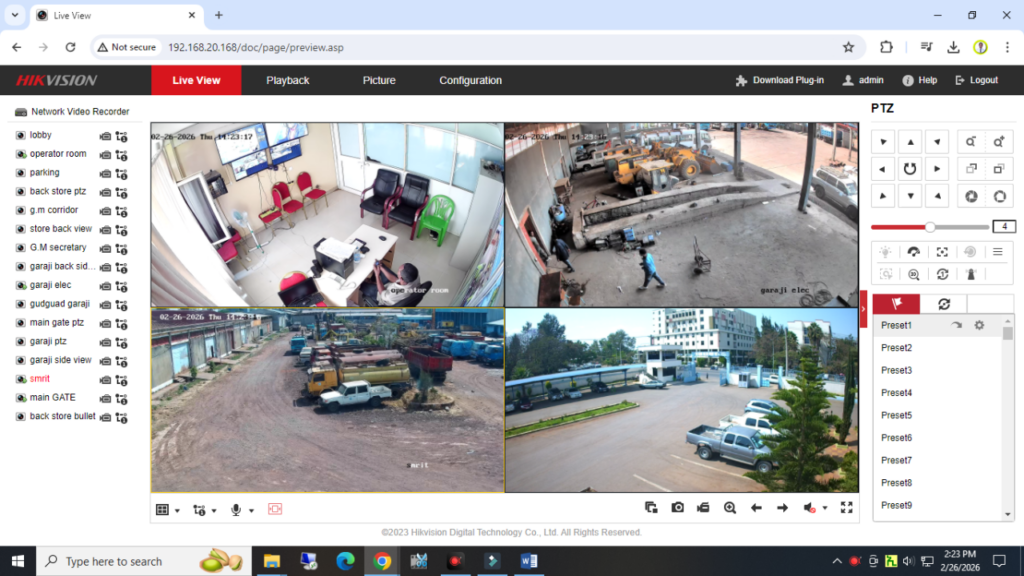
This is the easiest and fastest method, especially for beginners.
When to Use This Method
- PC and NVR are on the same network
- You want quick access without installing software
Step-by-Step Guide
- Connect your PC and NVR to the same router
- Open a web browser (Google Chrome or Microsoft Edge)
- In the address bar, enter your NVR IP address
- Example: 192.168.20.168
- Press Enter
- Login using your username and password
What You Can Do:
- View live camera feeds
- Playback recorded videos
- Basic system configuration
👉 If the page doesn’t load, double-check your IP address and network connection.
Method 2: Access Using Hikvision Software (Recommended)
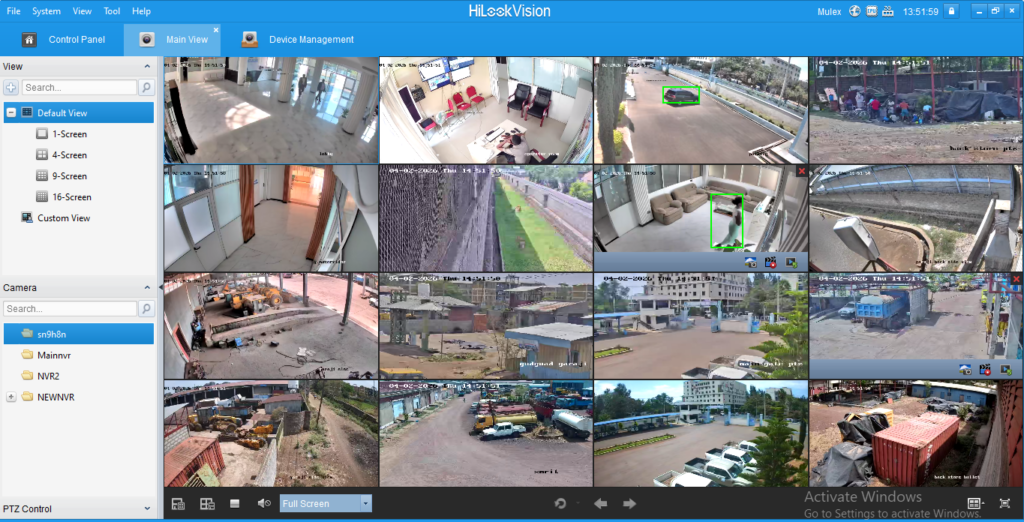
For professional use, Hikvision’s official software provides more features and better performance.
Step 1: Install the Software
- Download Hikvision software (iVMS-4200 recommended)
- Install and open the application
Step 2: Add Your NVR
- Go to Device Management
- Click Add Device
- Enter the following details:
- IP Address
- Port (default: 8000)
- Username
- Password
- Click Add
Step 3: Start Live View
- Go to Live View
- Select your device
- Drag and drop cameras onto the screen
Benefits of Using Software:
- Supports multiple cameras easily
- Better video stability
- Advanced settings and controls
- Suitable for business environments
👉 This is the best method for offices and security monitoring rooms.
Method 3: Remote Access (Outside Your Network)
Want to access your CCTV system from anywhere? You can enable remote access.
Option 1: Using Hik-Connect
- Create a Hik-Connect account
- Enable Hik-Connect on your NVR
- Link your device to your account
- Login from your PC or mobile app
Option 2: Using Public IP (Advanced Users)
- Configure port forwarding on your router
- Use your public IP address
⚠️ Warning:
Always use strong passwords and avoid exposing your system without proper security.
Real-Life Use Case in Ethiopia
In cities like Bahir Dar, many businesses use Hikvision NVR systems for:
- Shop surveillance
- Office monitoring
- Warehouse security
Common Setup:
- 4–8 cameras
- NVR connected to router
- PC monitoring in office
Results:
- Better control over daily operations
- Faster incident response
- Improved overall security
⚡ Common Problems and Solutions
Here are some common issues users face and how to fix them:
❌ Cannot Connect to NVR
Solution:
- Check if PC and NVR are on the same network
- Verify IP address
- Restart router and NVR
❌ Incorrect Username or Password
Solution:
- Double-check login details
- Reset password if necessary
❌ No Video Display
Solution:
- Check camera connections
- Update software or browser
- Ensure cameras are powered on
❌ Browser Not Working Properly
Solution:
- Use Microsoft Edge instead of Chrome
- Install required plugins if prompted
📍 Expert Tips for Better Performance
To ensure smooth and secure operation:
- ✔ Assign a static IP to your NVR
- ✔ Use strong and unique passwords
- ✔ Regularly update firmware
- ✔ Use UPS (backup power) to prevent shutdown
- ✔ Monitor storage capacity
👉 ጥሩ አስተዳደር የCCTV ስርዓትን ይጠናክራል።
☑ Frequently Asked Questions (FAQ)
1. What is an NVR IP address?
It is a unique network address that allows your PC to locate and connect to the NVR.
2. Can I access my NVR without internet?
Yes. You can access it locally using a web browser or software.
3. Which software is best for Hikvision?
iVMS-4200 is the most recommended software for PC access.
4. Why can’t I access my NVR remotely?
Possible reasons:
- Internet not working
- Incorrect configuration
- Port forwarding not set
✅ Conclusion
Accessing your Hikvision NVR on a PC using its IP address is a simple yet powerful way to manage your CCTV system. Whether you choose a web browser for quick access or professional software for advanced control, both methods are effective.
For users in Ethiopia, especially in growing cities like Bahir Dar, having proper CCTV access improves security, monitoring, and overall system efficiency.
By following this guide, you can easily set up and manage your surveillance system with confidence.
👉 በአጠቃላይ፡ በፒሲ ላይ ካሜራ መመልከት ቀላል ነው እና በጣም ጠቃሚ ነው።
Need Professional Help?
If you want a reliable and properly configured CCTV system, it’s best to work with experts.
👉 Contact BlueWave Technology for:
Ensure your system is secure, optimized, and working perfectly.